Best Wireless Gaming Headsets Under $100 in 2026
Five wireless gaming headsets that won't drain your wallet, compared across PC, PS5, and Xbox for latency, sound quality, and comfort. Expert picks, pros and...
As an Amazon Associate we earn from qualifying purchases made through our links — this doesn't affect our picks.
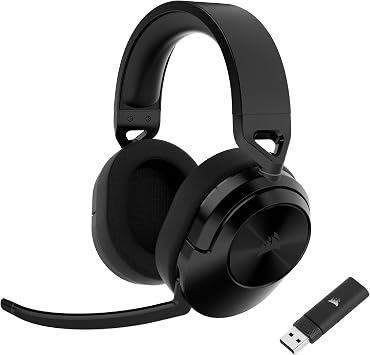
Corsair HS55 Wireless Multiplatform Gaming Headset
Our top recommendation for this category
Price as of Sep 4, 2026 — see current price on Amazon.
In this guide
- Corsair HS55 Wireless. Best Budget Pick Under $70
- Razer Kaira HyperSpeed. Best for Xbox + PC
- Turtle Beach Stealth 600 Gen 3. Best for Console Gamers
- Razer BlackShark V2 HyperSpeed. Best for PC Competitive Gaming
- ASTRO A20 Gen 2 Wireless. Best for PlayStation Users
- What to Look For in a Wireless Gaming Headset
- Bottom Line
Two years ago, a wireless gaming headset under $100 meant compromising on latency, battery life, or sound quality. Usually all three. That's changed. The budget wireless headset category has genuinely improved, and you can now get a solid performing headset for under $100 that doesn't feel like a budget product.
This guide compares all five of these headsets across PC, PS5, and Xbox Series X, paying particular attention to wireless latency, battery life, and mic quality. Because frankly, those are the three things that actually matter for gaming.
| Headset | Price | Battery | Connection | Best For | |
|---|---|---|---|---|---|
| Corsair HS55 Wireless | $69.99 | 24 hrs | 2.4GHz + Bluetooth | Budget Multiplatform | Check Price |
| Razer Kaira HyperSpeed | $99.99 | 30 hrs | 2.4GHz + Bluetooth | Xbox + PC Pick | Check Price |
| Turtle Beach Stealth 600 Gen 3 | $99.99 | 48 hrs | 2.4GHz | Console Gaming | Check Price |
| Razer BlackShark V2 HyperSpeed | $99.99 | 70 hrs | 2.4GHz HyperSpeed | PC Competitive | Check Price |
| ASTRO A20 Gen 2 Wireless | $99.99 | 15 hrs | 2.4GHz | PlayStation Users | Check Price |
Corsair HS55 Wireless. Best Budget Pick Under $70
Corsair HS55 Wireless Multiplatform Gaming Headset
Pros
- 2.4GHz and Bluetooth simultaneously, PC and phone at once
- 50mm drivers sound fuller than most budget headsets
- Dolby 7.1 Surround on PC
- Works across PC, PS5, PS4, Switch, and mobile
Cons
- Omni-directional mic picks up more room noise than a boom arm
- iCUE software needed for full EQ control
- 24-hour battery is solid but not class-leading
Price as of Sep 4, 2026 — see current price on Amazon.
At $69.99, the Corsair HS55 Wireless is the entry point on this list, and it earns its spot. Corsair doesn't cut corners even at the budget end of their lineup.
The dual-mode connectivity (2.4GHz + Bluetooth) is a genuinely useful feature at this price. Connect the USB dongle to your PC for low-latency gaming, keep your phone paired via Bluetooth, and switch between them without replugging anything. It's the same trick a lot of premium headsets charge $100+ for.
Sound quality is honest for $70. The 50mm drivers produce decent bass and a clean midrange. Not audiophile territory, but for voice chat and gaming (footsteps, directional cues, explosions) it delivers. The Dolby 7.1 surround on PC adds useful spatial depth in games like Warzone or Apex.
The omni-directional mic is fine. No boom arm, just a fixed mic that captures voice. Background noise gets picked up more than a directional boom would, but for Discord gaming it's clear enough.
Battery life is 24 hours on 2.4GHz, charged via USB-C. Enough for several nights of gaming without stressing about the charge.
Razer Kaira HyperSpeed. Best for Xbox + PC
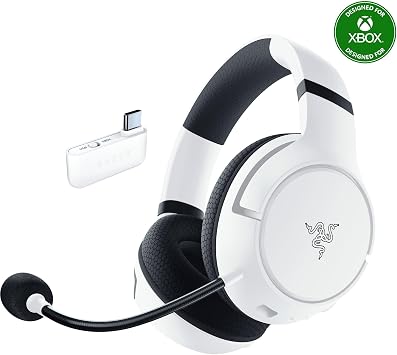
Razer Kaira HyperSpeed Wireless Gaming Headset
Pros
- 30-hour battery on 2.4GHz wireless
- HyperClear cardioid mic rejects room noise well
- Low-latency Bluetooth for mobile as a secondary connection
- Works on Xbox Series X|S, Xbox One, and PC
- FlowKnit memory foam cushions stay comfortable long sessions
Cons
- $99.99 is at the top of this bracket
- Razer Synapse app needed for EQ and mic settings
- No 3.5mm wired fallback
Price as of Sep 4, 2026 — see current price on Amazon.
The Razer Kaira HyperSpeed is the right pick if you split time between Xbox and PC. The USB-C 2.4GHz dongle connects to both, and there's a low-latency Bluetooth mode as a secondary connection for mobile. It's the most flexible platform story of any headset at this price.
Thirty hours on 2.4GHz is solid. Battery anxiety won't be a thing with this headset. The TriForce 50mm drivers hit a good gaming balance: clean midrange, enough bass for impact, and a soundstage that makes directional audio in competitive games clear without feeling artificially widened.
The HyperClear cardioid mic is a genuine step up over the fixed omni-directional mics on budget headsets. Cardioid pickup focuses on your voice and rejects audio from the sides and behind. Your squadmates hear you clearly, and background noise doesn't creep in. It's a confident mic for voice chat and won't embarrass you on a Discord call.
Build is solid for the price. The FlowKnit memory foam ear cushions are comfortable for longer sessions without the heat buildup that leatherette pads get after an hour. The headband adjustment feels durable, not plasticky.
One thing worth noting: this is a Razer HyperSpeed headset, and so is the BlackShark V2 further down this list. They're different products for different use cases: the Kaira HyperSpeed is the Xbox-compatible all-rounder. The BlackShark V2 HyperSpeed is the PC-only long-session choice with 70-hour battery. If you're on PlayStation, skip to the ASTRO A20 Gen 2.
Turtle Beach Stealth 600 Gen 3. Best for Console Gamers

Turtle Beach Stealth 600 Gen 3 Wireless Gaming Headset
Pros
- 48-hour battery life, two full days of gaming
- Works on PS5, Xbox, Nintendo Switch, and PC
- Swappable ear cushions for hygiene
- Superhuman Hearing mode for competitive audio
Cons
- At $100, it's at the top of this category
- App required for EQ adjustments
- Microphone quality is average, not great
Price as of Sep 4, 2026 — see current price on Amazon.
The Stealth 600 Gen 3's killer feature is battery life. 48 hours. Two full days of continuous gaming on a single charge. If you hate charging your headset. And I am in that camp. This is the headset for you.
Turtle Beach makes the console version of this headset for both PlayStation and Xbox, and there's also a universal version. Make sure you're buying the right variant for your platform. The PS5 version connects via USB-A dongle and supports 3D Audio from PlayStation's native audio engine. And the Xbox version connects directly to the console via Microsoft's built-in wireless protocol, no dongle needed.
The "Superhuman Hearing" mode is one of those features that sounds like marketing but has a real purpose. It boosts high-frequency sounds. Specifically footsteps, reloads, and environmental audio cues. Making them easier to hear in competitive games. It's not as dramatic as the name implies, but the aim is to make approaching enemies easier to pick out in games like Warzone.
The mic is the weak spot. It's a fixed flip-to-mute boom mic, which is fine, but voice quality comes across as a bit muddy compared to a dedicated cardioid mic. For casual use it's fine. For streaming or if your teammates are audio-sensitive, the Razer Kaira HyperSpeed's cardioid mic is the better call.
Razer BlackShark V2 HyperSpeed. Best for PC Competitive Gaming

Razer BlackShark V2 HyperSpeed Wireless Gaming Headset
Pros
- 70-hour battery life (exceptional)
- HyperSpeed 2.4GHz wireless has very low latency
- TriForce 50mm drivers tuned for competitive gaming
- Also works with Bluetooth simultaneously
- Lightweight design at 260g
Cons
- PC-focused; console compatibility is limited
- Razer Synapse software required for full features
- eSports aesthetic isn't for everyone
Price as of Sep 4, 2026 — see current price on Amazon.
Razer's HyperSpeed wireless technology is legitimately good. The 2.4GHz connection maintains a stable, low-latency link even in environments with heavy wireless interference.
The 70-hour battery life is absurd in the best way. At a few hours of play a day, that's a charge every couple of weeks. The standby mode extends that further. Leave it on your desk and it'll still be at 80% after a week.
The TriForce drivers are tuned for competitive audio. Meaning they emphasize midrange clarity and high-frequency detail over bass punch. If you want a headset that makes music sound good, look elsewhere. If you want a headset that makes enemy footsteps sound close and directional, this is it.
One note: this is primarily a PC headset. Console support exists but is limited. If you game on PlayStation or Xbox, the Turtle Beach above or the ASTRO below are better fits.
ASTRO A20 Gen 2 Wireless. Best for PlayStation Users
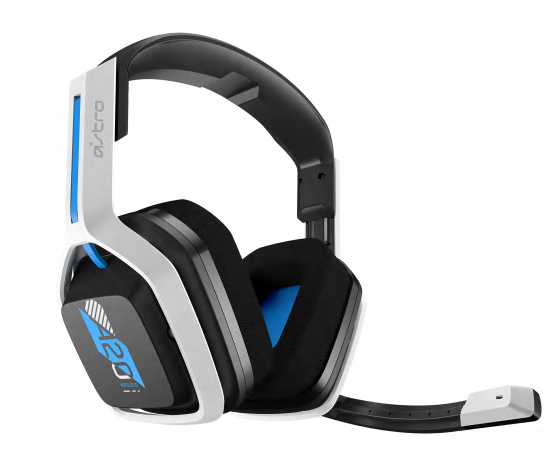
ASTRO Gaming A20 Wireless Gen 2 Headset for PlayStation
Pros
- Plug-and-play on PS5 and PS4, no software needed
- Built-in audio/mic balance wheel is genuinely useful
- Comfortable enough for 4-5 hour sessions
- Flip-to-mute boom mic
Cons
- 15-hour battery is shorter than competitors
- PC use requires the included USB transmitter
- ASTRO's audio tuning prioritizes clarity over impact
Price as of Sep 4, 2026 — see current price on Amazon.
ASTRO headsets have always had a reputation in the console space, and the A20 Gen 2 earns it on PlayStation specifically. Connect the USB transmitter to PS5 or PS4, and it just works. No app, no pairing ritual, no firmware update prompt.
The physical audio/mic balance wheel on the headset is the standout feature. It's a dial that blends game audio and voice chat audio in real time. When your squad is strategizing, roll toward voice chat. When you're in a tense moment and need to hear the game, roll toward game audio. It's faster and more intuitive than digging through an in-game menu.
Honestly, the 15-hour battery is the only thing I'd call a real limitation. Both the HyperX and Stealth 600 significantly outlast it. But if you're not a marathon gaming session person. And if you charge it nightly. 15 hours is fine for most evenings.
Audio quality is solid, not spectacular. ASTRO's tuning tends toward clarity and voice intelligibility rather than bass emphasis, which works well for multiplayer games where hearing teammates and enemies clearly matters more than hearing explosions dramatically.
What to Look For in a Wireless Gaming Headset
Wireless technology matters more than you'd think. Not all 2.4GHz wireless is equal. Cheap 2.4GHz headsets can desync, drop audio, or add noticeable latency. All five headsets on this list use solid 2.4GHz implementations that I'd trust for gaming. Bluetooth-only headsets are generally not suitable for gaming. The latency is too high.
Battery life cutoffs. Under 15 hours makes a headset annoying to manage. 20 hours is my minimum for a wireless headset, and the Stealth 600's 48 hours and the Razer's 70 hours are a real step past that.
Platform compatibility. Check the platform version before buying. Turtle Beach and ASTRO both make platform-specific variants. Both Razer headsets here differ by platform: the Kaira HyperSpeed targets Xbox and PC, while the BlackShark V2 HyperSpeed is PC-focused. For PlayStation and Nintendo Switch, both the Corsair HS55 Wireless and Turtle Beach Stealth 600 Gen 3 work via USB dongle. Native Xbox wireless is a specific feature: only Turtle Beach's Xbox variant has it in this price range.
Mic quality for your use case. If you're playing casually with friends, any mic on this list works fine. If you're streaming or your squadmates are audio-sensitive, the Razer Kaira HyperSpeed's cardioid mic is the strongest performer in this roundup. Cardioid pickup rejects background noise in a way that fixed omni-directional mics can't match.
Frequently asked questions
- Is wireless gaming headset latency good enough for competitive games?
- Yes, with modern 2.4GHz wireless. The latency difference between a wired and a quality 2.4GHz wireless headset is typically 15-40ms, which is not perceptible in gaming. Bluetooth headsets are a different story. Bluetooth latency is usually 100-200ms, which you can actually notice. Stick with 2.4GHz wireless for gaming.
- What is the best budget wireless gaming headset under $70?
- The Corsair HS55 Wireless at $69.99 is the best value wireless option in this range. It handles voice chat and gaming well across PC, PS5, PS4, and Switch, with dual 2.4GHz and Bluetooth connectivity. The 50mm drivers sound fuller than what you typically get at this price.
- How long should a wireless gaming headset battery last?
- I consider 20+ hours a reasonable minimum for a wireless gaming headset. 30+ hours is excellent. The Razer BlackShark V2 HyperSpeed's 70-hour battery is the standout on this list. If battery anxiety is your main concern, that's the one.
- Can I use a wireless gaming headset on both PC and console?
- Most 2.4GHz headsets work across PC, PS5, PS4, and Nintendo Switch via USB dongle. Xbox wireless protocol is proprietary. Most third-party headsets need a 3.5mm connection on Xbox, or a USB dongle (check compatibility carefully). Turtle Beach makes Xbox-specific wireless variants.
- Is there a meaningful audio quality jump between $70 and $100 wireless headsets?
- It's a smaller gap than it used to be. The Corsair HS55 Wireless at $70 sounds solid for gaming and voice chat. The headsets at $100, the Razer Kaira HyperSpeed, the Turtle Beach Stealth 600, the BlackShark V2, the ASTRO A20, each bring something the HS55 doesn't: better battery, a stronger mic, or more platform flexibility. If the HS55 covers your platform and use case, it's genuinely worth it at $70. If you need Xbox compatibility or a cardioid mic, spend the extra $30.
Bottom Line
For Xbox + PC users, the Razer Kaira HyperSpeed is the clearest choice: 30-hour battery, a cardioid mic that actually rejects room noise, and a flexible 2.4GHz + Bluetooth dual-mode connection at $99.99. It covers both platforms without compromise.
If you want to spend less, the Corsair HS55 Wireless at $69.99 is genuinely good for multiplatform gaming and casual use. If battery life is your priority, the Turtle Beach Stealth 600 Gen 3's 48-hour battery is unmatched. And if you're primarily on PlayStation, the ASTRO A20 Gen 2 just works plug-and-play with no fuss.
How We Pick
We pick products by combining spec-level research, price checks, trusted third-party benchmarks, and owner sentiment from high-signal sources.
- Performance and real-world value in the category this guide targets
- Price-to-performance and deal consistency over recent pricing windows
- Build quality, reliability patterns, and known long-term issues
- Recommendation refresh cadence to keep these picks current
Author
TheTechSearch Editorial Team
Independent product reviewers & PC builders
We compare real-world specs, reviews and owner reports, price trends, and user feedback to recommend gear that actually makes sense to buy.