Best RTX 5090 Graphics Cards 2026
Which RTX 5090 AIB should you buy? We rank the ROG Astral, TUF Gaming, MSI SUPRIM SOC, AORUS Master, and Zotac AMP Extreme on cooling, clocks, and value.
As an Amazon Associate we earn from qualifying purchases made through our links — this doesn't affect our picks.
ASUS ROG Astral GeForce RTX 5090 32GB GDDR7 OC Edition
Our top recommendation for this category
Price as of Jun 3, 2026 — see current price on Amazon.
In this guide
- ASUS ROG Astral GeForce RTX 5090 32GB OC: Best Overall
- ASUS TUF Gaming GeForce RTX 5090 32GB OC: Best Value
- MSI GeForce RTX 5090 32G SUPRIM SOC: Best for Overclockers
- Gigabyte AORUS GeForce RTX 5090 Master 32G: Highest Factory Overclock
- Zotac Gaming GeForce RTX 5090 AMP Extreme Infinity: Best for ARGB Builds
- What to Look for When Buying an RTX 5090
- Bottom Line
Whether to buy an RTX 5090 is a question for a different article. If you're here, you've already decided you want the fastest consumer GPU available, and you need to know which one to actually order. That choice matters more than most people expect.
Every RTX 5090 shares the same Blackwell die: 21,760 CUDA cores, 32GB GDDR7 running at 28 Gbps across a 512-bit bus, and PCIe 5.0. But the AIB cards sitting at $2,999 to $3,500+ differentiate on cooling tier, PCB quality, factory overclock, and how the card behaves during sustained load in a warm case. Get that wrong and you're throttling at 80% of what you paid for.
Computex 2026 brought a few things worth knowing: ASUS announced the ROG Astral Edition 20 anniversary variant, Gigabyte refreshed the AORUS INFINITY line, and MSI teased the SUPRIM Safeguard with hardware eFuse protection and real-time power monitoring. None of those were on Amazon when this guide was written. The five cards below are the ones with real listings, ranked by who each one is for.
A quick note on sales: discounts on flagship AIB cards during big events like Prime Day have historically averaged 5-8%. On a $3,199 card that's $160-255 off. If you need a card now, buy it now. If you can genuinely wait, set a stock alert and watch for the next sale event. Do not pay $5,000+ from third-party sellers marked "ships from China" regardless of the date.
| ROG Astral OC | TUF Gaming OC | MSI SUPRIM SOC | AORUS Master | AMP Extreme Infinity | |
|---|---|---|---|---|---|
| Price | ~$3,499 | ~$2,999 | ~$3,299 | ~$3,199 | ~$3,099 |
| Boost Clock | 2,610 MHz | 2,580 MHz | 2,580 MHz | 2,655 MHz | 2,467 MHz |
| Cooling | 4-fan + vapor | 3-fan + vapor | 3-fan + vapor | WINDFORCE 3-fan | IceStorm 3.0 |
| Slot Width | 3.8-slot | 3.6-slot | 3.75-slot | 4.0-slot | 3.5-slot |
| Warranty | 3 years | 3 years | 3 years | 4 years (w/reg) | 3 years |
| Best For | Enthusiast flagship | Best value | Overclocking | Max factory OC | ARGB builds |
ASUS ROG Astral GeForce RTX 5090 32GB OC: Best Overall
ASUS ROG Astral GeForce RTX 5090 32GB GDDR7 OC Edition
Pros
- Quad-fan design runs 8-11°C cooler than tri-fan alternatives under sustained load
- Phase-change thermal pad maintains die contact quality over years of use
- Three-year ASUS warranty with a claims process that is actually fast
- BTF variant available for clean cable-free builds
Cons
- 3.8-slot width will not fit compact mid-tower cases without measuring first
- Roughly $500 premium over the TUF Gaming for cooling headroom most people will never use
Price as of Jun 3, 2026 — see current price on Amazon.
ROG's first quad-fan graphics card is a different category of product from everything else here. The fourth fan is not marketing: it moves more air through a denser heatsink stack, which matters most in a hot room with no AC. Lower sustained temperatures mean sustained boost clocks instead of throttled ones.
The phase-change thermal pad is the detail I keep returning to. Standard thermal pads degrade over two to three years of thermal cycling. ASUS uses a compound that transitions from solid to liquid at GPU operating temperatures, maintaining full die contact across the card's lifetime. On a $3,499 card you're planning to use for five years, that's not a footnote.
The 3.8-slot footprint is a real constraint. The card is 357.6 x 149.3 x 76mm. That size can conflict with drive bays in compact mid-towers and with case fan brackets in some ITX cases. If the size is fine for your build, also check out the BTF variant (B0FJVQYGQW), which eliminates the 16-pin connector entirely using a proprietary board slot. It requires an ROG HYPER M BTF-compatible motherboard, but the cable-free result is genuinely clean.
The Edition 20 variant announced at Computex 2026 uses the same cooling stack with 20th-anniversary aesthetics: a metallic badge and revised shroud. Once it hits Amazon it will carry a small premium. If you want the card now, the standard OC edition performs identically.
ASUS TUF Gaming GeForce RTX 5090 32GB OC: Best Value
ASUS TUF Gaming GeForce RTX 5090 32GB GDDR7 OC Edition
Pros
- $500 less than the ROG Astral with 99% of real-world gaming performance
- Military-grade capacitors and protective conformal PCB coating for long-term durability
- 3.6-slot footprint fits cases where the ROG Astral physically won't
- Same three-year ASUS warranty coverage
Cons
- Less thermal headroom for hot ambient or restricted-airflow cases
- Subdued RGB compared to MSI and Zotac options at similar prices
Price as of Jun 3, 2026 — see current price on Amazon.
The TUF Gaming RTX 5090 is what most people should buy. In real gaming workloads at 4K, the frame rate difference between the TUF Gaming OC and the ROG Astral is around 1%. You are paying $500 for 1% performance and 6 degrees Celsius. For most builds, that calculus does not work out.
Where the TUF justifies itself beyond price is the PCB construction. Military-spec capacitors rated for higher temperature cycling, and a conformal lacquer coating that prevents moisture and dust from reaching the board traces. If you run your rig in a humid environment or plan to keep this GPU for four-plus years, that coating is quietly valuable insurance. A lot of competing cards at this price point skip it entirely.
The 3.6-slot design clears most cases that could fit a previous-gen 3-slot card without issue. Three Axial-tech fans with vapor chamber cooling keep temperatures honest. In a well-ventilated mid-tower, that cooler is sized to hold the 2,580 MHz boost clock under sustained 4K load without throttling.
The aesthetics are clean without being aggressive: black and silver shroud, subtle end-cap RGB, no flashy infinity effects. For a windowed build where you want the hardware to be visible but not dominate the room, this actually looks good.
MSI GeForce RTX 5090 32G SUPRIM SOC: Best for Overclockers
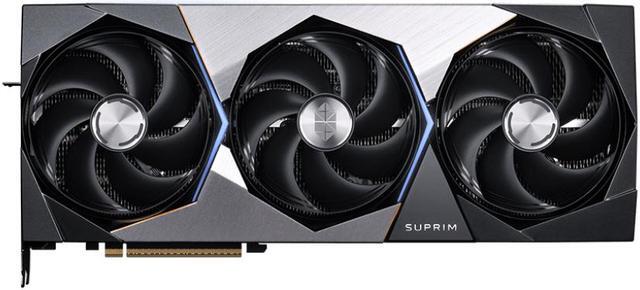
MSI GeForce RTX 5090 32G SUPRIM SOC
Pros
- 580W default TGP with a toggle to 600W maximum (lower baseline than ROG Astral)
- TORX 5.0 interlocking fan blades produce a noticeably smoother acoustic profile
- MSI Afterburner compatibility with full voltage and fan curve control
- SOC PCB design uses tighter VRM tolerances preferred by manual overclockers
Cons
- Heavier than competing cards at around 2.1kg
- MSI warranty claim response times lag behind ASUS in user reports
Price as of Jun 3, 2026 — see current price on Amazon.
MSI's SUPRIM SOC takes a different approach than ASUS. Where the ROG Astral prioritizes thermal headroom above everything, the SUPRIM SOC is built around power delivery quality and overclocking architecture. SOC (Single Owner Circuit) is MSI's branding for a tighter VRM layout with more granular phase staging, which manual overclockers prefer for voltage curve manipulation in Afterburner.
The default TGP is 580W, with a one-click toggle in MSI Dragon Center to unlock 600W maximum. Running at the 580W default, the SUPRIM SOC posts the same 2,580 MHz boost as the TUF Gaming while generating slightly less heat. That is a useful card for builds where PSU headroom is genuinely tight, though you still need a minimum 1000W unit.
TORX 5.0 fan blades use a shared frame between adjacent blades that stiffens the assembly and cuts vibration. If you do late-night gaming or content work with open-back headphones, the acoustic character matters.
One thing to keep in mind: MSI announced the SUPRIM Safeguard at Computex 2026, adding hardware eFuse protection that physically disconnects the PCB from the power rail before damage can occur, plus real-time power monitoring with on-card warnings. That card is not on Amazon yet. When it lands, it will likely replace the SUPRIM SOC as the top MSI overclocking pick. For now, the SUPRIM SOC is the right call.
Gigabyte AORUS GeForce RTX 5090 Master 32G: Highest Factory Overclock
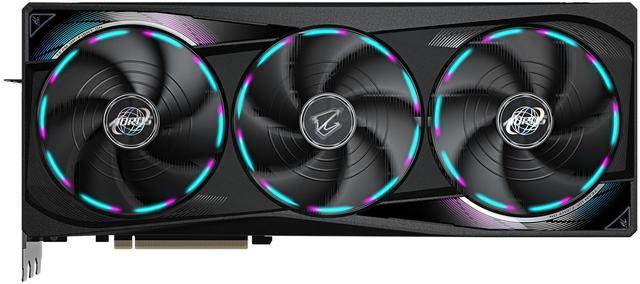
Gigabyte AORUS GeForce RTX 5090 Master 32G
Pros
- 2,655 MHz boost is the highest factory OC of any air-cooled RTX 5090 currently on Amazon
- Four-year warranty with product registration (best in class)
- WINDFORCE alternating fan rotation reduces turbulence and smooths noise profile
- AORUS LCD panel shows GPU stats or custom image in real time
Cons
- 4-slot width blocks the adjacent PCIe lane on most ATX boards
- WINDFORCE runs warmer than ASUS vapor chamber under extreme sustained load
Price as of Jun 3, 2026 — see current price on Amazon.
The AORUS Master posts the highest factory overclock on this list: 2,655 MHz boost, 45 MHz ahead of the ROG Astral and 75 MHz ahead of the TUF Gaming. In GPU-intensive compute workloads and 3D rendering, that difference compounds over hours. In 4K gaming it shows up as a consistent 2-3% frame rate lead over other air-cooled options.
Gigabyte's WINDFORCE cooling alternates fan rotation direction so adjacent fans spin opposite ways. This cancels the turbulence that same-direction fans create where their airflows meet. Peak temperatures are similar to competing triple-fan designs, but the noise profile is more uniform: a clean hum rather than the harmonic resonance you sometimes hear from same-rotation arrays.
The four-year warranty (three years standard, extended to four with product registration) is the best coverage on this list. At $3,199 on a card that is genuinely difficult to replace if it fails, that extra year of coverage matters. ASUS stops at three years with no extension path.
One practical issue: 4-slot width. The AORUS Master is the widest air-cooled RTX 5090 available right now, and it physically blocks the PCIe slot directly beneath it on most ATX boards. Before ordering, check your board layout and confirm you have an open lane above the x16 slot for any M.2 adapters or capture cards you plan to keep.
The refreshed AORUS INFINITY announced at Computex 2026 uses an updated cooling stack with a redesigned OLED end-cap. It is not on Amazon as of today. When it appears, it will sit above the Master in Gigabyte's lineup at a small premium.
Zotac Gaming GeForce RTX 5090 AMP Extreme Infinity: Best for ARGB Builds
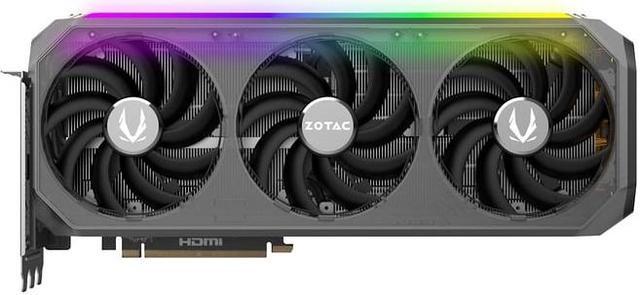
Zotac Gaming GeForce RTX 5090 AMP Extreme Infinity
Pros
- Spectra 2.0 infinity mirror ARGB looks unlike any other card under glass
- 3.5-slot footprint is the narrowest on this list, fits more case layouts
- IceStorm 3.0 uses a 34% larger vapor chamber than the previous generation
- Typically the most affordable AIB option in this tier
Cons
- 2,467 MHz boost clock trails the field by 113-188 MHz
- Runs 82-84°C under sustained load, warmer than vapor-chamber ASUS designs
Price as of Jun 3, 2026 — see current price on Amazon.
Zotac's AMP Extreme Infinity is the most visually distinctive RTX 5090 you can buy, and that is a legitimate criterion for a glass-panel showcase build.
The infinity mirror on the front shroud is not a standard ARGB strip bolted to a heatsink fin. It is a half-silvered panel over a layered LED array that creates genuine depth. Under a glass panel at night, it looks fundamentally different from everything else. If your PC lives next to a streaming camera or in a room where the case is part of the display setup, this card has a specific aesthetic that nothing else matches.
Performance is straightforward to assess. The 2,467 MHz factory boost is a mild step up from the 2,407 MHz Founders Edition baseline. In 4K gaming at maximum settings, you will not notice the 188 MHz gap between this and the AORUS Master. Both cards are memory-bandwidth-limited before they are clock-limited in modern titles. Synthetic benchmarks will show a 4-5% gap. In Cyberpunk 2077 at 4K with path tracing, the frame rate difference is roughly 2 frames per second.
IceStorm 3.0 uses a 34% larger vapor chamber footprint than Zotac's previous generation. Under sustained load in a well-ventilated mid-tower, temperatures settle around 82-84°C. That is within specification but hotter than what the ASUS vapor chamber solutions produce. If your case has limited airflow or your ambient temperature runs above 25°C, the TUF Gaming or SUPRIM SOC serve you better. For a standard open mid-tower with front intake fans, this is fine.
At roughly $3,099, it is typically the least expensive AIB option in this comparison. For a card bought partly for how it looks, that price-to-aesthetics ratio is a reasonable trade.
What to Look for When Buying an RTX 5090
Cooling Tier and Your Case Airflow
The RTX 5090 runs a 575W reference TDP, with AIB models frequently pushing 600W. At those power levels, cooling design determines whether you hold boost clocks or throttle. Cards with vapor chamber cooling (ASUS ROG, ASUS TUF, MSI SUPRIM) distribute heat uniformly across the die. Cards using heatpipe arrays run hot spots 15-20°C higher at the same average GPU temperature, and NVIDIA's boost algorithm responds to hot spots, not averages.
If your case has restricted airflow, tight cable management, or sits in a warm room, buy the ROG Astral or TUF Gaming. The quad-fan and tri-fan vapor chamber designs have the most thermal buffer. In a well-ventilated standard mid-tower, any card here handles sustained workloads without issue.
Factory Overclock vs Real-World Gains
The AIB cards here range from 2,467 MHz (Zotac) to 2,655 MHz (AORUS Master), a 188 MHz spread that sounds large. In GPU-bound 4K gaming, that range translates to roughly 2-4% frame rate difference. For creative workloads like Blender or DaVinci Resolve GPU rendering, where compute time compounds across a project, the AORUS Master's extra headroom genuinely returns time. For gaming alone, it is largely imperceptible.
PCB Quality Over the Long Haul
At $3,000+, longevity matters. Three factors: capacitor grade, VRM topology, and protective coating. ASUS TUF uses military-spec caps and a conformal lacquer layer that seals board traces from humidity and fine dust. MSI SUPRIM SOC uses a premium VRM layout with tighter tolerances. Both AORUS Master and Zotac use solid components but do not advertise the same certification level.
If you are buying this card to use for five-plus years, ASUS TUF's PCB coating and Gigabyte's 4-year warranty are the two strongest reliability arguments on this list.
PSU Requirements
Every RTX 5090 AIB here requires a minimum 1000W PSU. With a current high-performance CPU pulling 200W, your system peak load sits around 900-950W. A 1000W unit running at 90% capacity continuously runs hot and shortens its own lifespan. If you are spending $3,000 on a GPU, put a 1200W or 1350W PSU behind it. The Corsair HX1500i and Seasonic Prime TX-1300 are where I would spend that money today.
Should You Wait for a Sale?
RTX 5090 supply is tighter than the channel typically admits, and restocks of the popular AIB models tend to sell through quickly. Discounts on flagship GPU AIBs during sale events like Prime Day or Black Friday have historically averaged 5-8%, which on a $3,199 card means roughly $160-255 off. That is meaningful but not dramatic.
If you need the card soon, buy it at a fair price from a first-party seller. If you can wait, set a stock alert on the specific card you want and check it against the next sale event. The Computex variants (the Edition 20 and AORUS INFINITY) follow their own release schedule, so holding out for one of those is a separate decision from waiting on a discount.
Frequently asked questions
- What is the real difference between the ROG Astral and TUF Gaming RTX 5090?
- Both use vapor chamber cooling, but the ROG Astral adds a fourth fan, a phase-change thermal pad, and a more aggressive VRM. Under sustained load this means 6-11°C lower GPU temperatures and 30 MHz higher boost. In real-world 4K gaming that gap is about 1% in frame rate. The TUF Gaming OC costs $500 less. For most users the TUF Gaming is the right answer. The ROG Astral is worth the premium for extended GPU compute work, hot ambient environments, or builds with restricted case airflow.
- Should I wait for the AORUS INFINITY or MSI SUPRIM Safeguard?
- Both were announced at Computex 2026 and are not on Amazon as of June 2026. The AORUS INFINITY carries a refreshed cooler with an updated OLED end-cap but the same performance tier as the AORUS Master. The SUPRIM Safeguard adds hardware eFuse protection and real-time power monitoring, which is genuinely useful for manual overclockers pushing voltage limits. If you plan to aggressively OC, the Safeguard is worth waiting for. Otherwise, buy the AORUS Master or SUPRIM SOC now.
- What PSU do I actually need for an RTX 5090 build?
- 1000W is the minimum, but 1200W is the right answer for a comfortable, durable build. A system with an RTX 5090 and a current high-performance CPU (Core Ultra 9 285K or Ryzen 9 9950X) can peak at 850-950W under combined full load. Running a 1000W PSU at 90% capacity continuously shortens PSU lifespan. A 1200W unit keeps you at a healthy 75% ceiling and leaves headroom for future upgrades. The Corsair HX1500i and Seasonic Prime TX-1300 are both strong choices.
- Which RTX 5090 is the quietest under load?
- The MSI SUPRIM SOC running in its 580W default power mode. TORX 5.0 fan blades use a shared outer frame that reduces vibration and produces a smoother noise profile than standard fans. The ASUS TUF Gaming OC is the second-quietest at three fans versus the ROG Astral's four. The ROG Astral is louder at full load simply because it moves more air through a denser heatsink stack.
- Is the Zotac AMP Extreme Infinity worth buying for a showcase build?
- Yes, specifically for the infinity mirror design. The half-silvered front panel with layered LED depth looks substantially different from any other card under a glass side panel. In a camera-facing gaming setup or a build where the case is on display, this is a genuine differentiator. The trade-off is a lower boost clock (2,467 MHz vs 2,580-2,655 MHz on competitors) and slightly warmer temps under load, but in actual gaming at 4K the performance gap is under 5%.
- Which RTX 5090 AIB has the best warranty?
- Gigabyte AORUS Master offers four years with product registration, versus three years for every other card on this list. ASUS's three-year process is consistently rated faster and less frustrating to navigate than Gigabyte's in user forums. If raw coverage length is your priority, the AORUS Master wins. If you care more about the experience of actually using the warranty, ASUS TUF or ROG Astral edges out on ease of claims.
Bottom Line
The ASUS TUF Gaming RTX 5090 OC is what most people should buy. At $2,999 it delivers 99% of the ROG Astral's real gaming performance at 86% of the cost, with a PCB built to last a decade and a vapor chamber cooler that works in standard airflow cases without drama.
If you want the best RTX 5090 on the market today regardless of price, buy the ROG Astral. If maximum factory overclock and a four-year warranty are your priorities, the Gigabyte AORUS Master at $3,199 makes a compelling case. If your build lives under glass with a camera pointed at it, the Zotac AMP Extreme Infinity's infinity mirror design is in a category by itself.
Before you click buy: confirm you have a 1000W minimum PSU (1200W preferred), check your case width against the card's slot count, and verify you are ordering from a first-party seller, not a Hong Kong shipper asking $5,000 for a $3,000 card.
How We Pick
We pick products by combining spec-level research, price checks, trusted third-party benchmarks, and owner sentiment from high-signal sources.
- Performance and real-world value in the category this guide targets
- Price-to-performance and deal consistency over recent pricing windows
- Build quality, reliability patterns, and known long-term issues
- Recommendation refresh cadence to keep these picks current
Author
TheTechSearch Editorial Team
Independent product reviewers & PC builders
We compare real-world specs, reviews and owner reports, price trends, and user feedback to recommend gear that actually makes sense to buy.