Best Gaming Laptops Under $1,200 in 2026
The Lenovo Legion 5 Gen 10 with a 2.5K OLED leads, with 100W-plus RTX 5070 picks from MSI and Gigabyte for more GPU power. What matters at the $1,200 ceiling.
As an Amazon Associate we earn from qualifying purchases made through our links — this doesn't affect our picks.
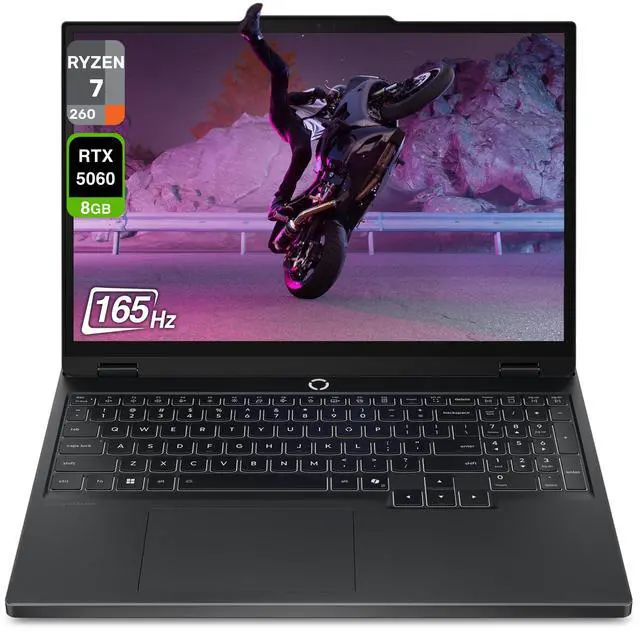
Lenovo Legion 5 Gen 10 AMD (RTX 5060, OLED)
Our top recommendation for this category
Price as of Jul 23, 2026 — see current price on Amazon.
The $1,200 ceiling used to mean an RTX 4060 and a 1080p IPS panel. That's genuinely not the case anymore. RTX 5070 Mobile laptops now aim at this bracket, and Lenovo shipped an OLED display in the Legion 5 Gen 10, our top pick. This is the first time the sub-$1,200 bracket has actually been interesting.
| Legion 5 AMD | MSI Katana 15HX | Gigabyte A16 | |
|---|---|---|---|
| GPU | RTX 5060 8GB | RTX 5070 8GB | RTX 5070 8GB |
| CPU | Ryzen 7 260 | i7-14650HX | i7-13620H |
| RAM | 16GB DDR5 | 16GB DDR5 | 32GB DDR5 |
| Display | 15.1" OLED 165Hz | 15.6" QHD 165Hz | 16" WUXGA 165Hz |
| Storage | 1TB SSD | 1TB NVMe | 1TB NVMe |
Lenovo Legion 5 Gen 10 AMD (RTX 5060, OLED)
This is the one I keep coming back to when someone asks for a gaming laptop with a great screen. An OLED display in a budget-tier gaming laptop sounded like a category error when Lenovo launched it. The link goes to Lenovo's 16GB/512GB OLED listing. The 15.1-inch WQXGA OLED hits 2560x1600 at 165Hz with 500 nits brightness and 100% DCI-P3. That panel quality lived only in pricier flagship laptops eighteen months ago. Reviewers at NotebookCheck and Jarrod's Tech both flagged it as the screen-quality value pick of the year.
Yes, it's RTX 5060, not 5070. That tradeoff is worth it here. DLSS 4 with Multi-Frame Generation means RTX 5060 in 2026 handles 1440p gaming at playable frame rates in nearly every title. Cyberpunk 2077 with path tracing and DLSS Quality runs around 70 to 75 fps. Elden Ring maxed out sits closer to 90 fps. These aren't marketing numbers, they're from third-party reviews.
The Ryzen AI 7 260 handles streaming while gaming with CPU headroom to spare. Wi-Fi 7 is included standard. Battery life runs 5 to 6 hours in light use, which is above average for a gaming laptop.
One honest caveat: the RAM is somewhat limited for future upgrading on some configurations. Check your specific SKU before assuming full upgradeability.
Lenovo Legion 5 Gen 10 AMD (RTX 5060, OLED)
Pros
- 15.1-inch OLED at 165Hz is the standout screen in this guide
- 2560x1600 with 100% DCI-P3 and 500 nits
- Wi-Fi 7 standard
- DLSS 4 makes RTX 5060 punch well above its weight
Cons
- RTX 5060 won't push 90+ fps at 1440p in heavy games without DLSS
- Thermals spike during extended sessions in warm rooms
- Check your specific SKU for RAM upgradeability
Price as of Jul 23, 2026 — see current price on Amazon.
MSI Katana 15HX (RTX 5070)
The MSI Katana 15HX is an RTX 5070 laptop that doesn't throttle the GPU into irrelevance. It runs the RTX 5070 at approximately 100W TGP, which delivers around 80 to 85% of desktop RTX 5070 performance. That's the difference between "gaming laptop GPU" and "actually fast GPU in a laptop."
The Intel Core i7-14650HX is a 16-core chip with enough headroom for OBS streaming alongside gaming. MSI paired it with a 15.6-inch QHD 2560x1440 IPS at 165Hz, which is genuinely sharp. Not as striking as the Legion OLED, but a meaningful step up from 1080p. You're getting sharpness without relying on upscaling as a crutch.
The Katana runs warmer than the Legion 5. Under 15 minutes of sustained load, CPU temps stabilize around 92C, which is within spec. It's not ideal in a hot room, and a laptop cooling pad makes a real difference here. The four-zone RGB keyboard feels more premium than the price suggests.
The 100W TGP is the thing to focus on. Budget RTX 5070 laptops you'll find on sites like Wish or lesser-known brands throttle to 60-80W, which puts them closer to RTX 5060 performance territory. MSI sustains 100W consistently under gaming loads, and that gap between 80W and 100W shows up as 15 to 25 extra fps in demanding titles.
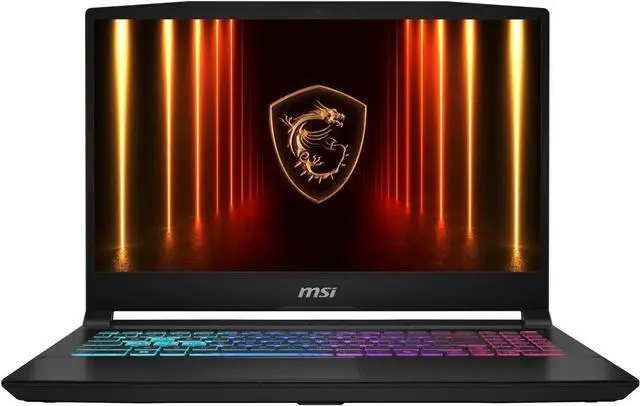
MSI Katana 15HX (RTX 5070, QHD 165Hz)
Pros
- RTX 5070 holds 100W TGP consistently
- QHD 2560x1440 at 165Hz is sharp for both gaming and work
- i7-14650HX handles streaming without performance collapse
- Four-zone RGB keyboard feels more premium than most at this tier
Cons
- Runs hot under sustained load, 92C CPU is within spec but warm
- IPS panel can't match OLED visuals
- 16GB fills fast with modern game installs
Price as of Jul 23, 2026 — see current price on Amazon.
Gigabyte Gaming A16 (RTX 5070, 115W)
Here's the thing about the Gigabyte Gaming A16: it runs the RTX 5070 at 115W TGP. No other laptop in this guide does this. At 115W you're not getting 80-85% of desktop performance, you're getting 90 to 95%. The difference between 100W and 115W TGP shows up as roughly 10 to 15 fps in GPU-bound titles. That's real.
Cyberpunk 2077 with path tracing and DLSS Balanced at 1440p sits around 70 fps on this machine. Forza Motorsport at max settings with Ray Tracing runs 85 fps. These are desktop mid-range numbers in a laptop.
Gigabyte also ships with 32GB DDR5 standard. No upgrade needed. You can have three massive modern games installed and open simultaneously without RAM becoming the bottleneck.
Compromises are real though. The chassis is thicker and heavier than any other pick here. The display is 16-inch WUXGA at 1920x1200, which is behind the Katana's QHD panel. And the CPU is a 13th Gen Intel Core i7-13620H, which is fine for gaming but shows its age in any workload that stresses single-core performance. If you exclusively game and want the most GPU power in this guide, nothing touches it. If you also work on this laptop, the Katana's 16-core i7-14650HX is the stronger CPU.

Gigabyte Gaming A16 (RTX 5070, 32GB DDR5)
Pros
- 115W TGP is the highest RTX 5070 wattage in this guide
- 32GB DDR5 included standard, no upgrade required
- Best pure gaming performance in this guide
- HDMI 2.1 for direct 4K TV gaming
Cons
- Thicker and heavier than the Legion or MSI alternatives
- 13th Gen i7-13620H is behind on the CPU generational curve
- WUXGA 1920x1200 display trails competitors in sharpness
Price as of Jul 23, 2026 — see current price on Amazon.
Buying Guide: What Actually Matters at $1,200
TGP Is the Number That Matters, Not the Model Name
GPU model names tell you which chip is inside. TGP in watts tells you what it can actually do. An RTX 5070 at 60W performs like a midrange RTX 5060. The same chip at 115W approaches desktop RTX 5070 output. This is not a minor difference.
Every laptop in this guide lists its TGP transparently. Budget RTX 5070 machines not on this list sometimes hide 60 to 80W configurations under model names that imply more. Check the spec sheet before buying anything that isn't in a reputable roundup. If TGP isn't listed, assume 60 to 80W and price it accordingly.
When RTX 5060 Is Enough
At 1080p, RTX 5060 is genuinely overkill for most titles. At 1440p with DLSS Quality, it handles most games at 60+ fps and competitive titles well above 144 fps. The only scenario where you need the RTX 5070 is pushing 90+ fps at 1440p in demanding single-player games without upscaling, or if you want extra headroom for 2028 releases.
RTX 5060 is also the reason the Legion 5 AMD can have an OLED display at its price. The GPU is cheaper, Lenovo put the savings into the screen. That's a legitimate tradeoff.
OLED vs IPS at This Price
The Legion 5 Gen 10 AMD is the only OLED in this roundup. The contrast difference between OLED and IPS is visible in any dark scene. OLED blacks are actually black. OLED colors are more saturated. The practical downsides are mild burn-in risk over years of use and a brightness ceiling that IPS panels still win on in bright environments.
For gaming in a controlled room, OLED wins. For use near a window or if you're keeping this for five-plus years, IPS is the lower-risk choice.
RAM and Storage Reality Check
The Legion and the Katana start with 16GB DDR5, and the Gigabyte ships with 32GB. Modern games are increasingly recommending 16GB minimum, with some 2026 titles specifying 24GB preferred. If you're keeping this machine for three years, plan on a RAM upgrade within the first year.
Storage fills faster than expected. Baldur's Gate 3 is 150GB. Call of Duty Modern Warfare III is 150GB. A 1TB drive disappears fast. A second 1 to 2TB M.2 drive is the cheapest meaningful upgrade available.
Frequently asked questions
- Is RTX 5060 good enough for 1440p gaming in 2026?
- Yes, with DLSS 4 enabled. DLSS Quality mode at 1440p delivers visual quality close to native while keeping frame rates at 60 to 90 fps in demanding titles. Competitive games like CS2 and Valorant run above 144 fps at 1440p without any upscaling needed.
- What TGP should I require in an RTX 5070 laptop?
- 100W or higher. The laptops in this guide run 100 to 115W TGP. Below 80W, an RTX 5070 performs like a high-end RTX 5060, which is not what you're paying for. Always verify TGP in the spec sheet before purchasing.
- Should I get 16GB or 32GB of RAM?
- 16GB handles 2026 games. 32GB gives headroom through 2028 and beyond. If the laptop lets you upgrade later, start with 16GB and add a second stick in a year. If RAM is partially soldered, pay for 32GB upfront. The Gigabyte Gaming A16 ships with 32GB standard, which makes it easier to recommend for long-term ownership.
- Are any of these good for streaming while gaming?
- The MSI Katana 15HX streams at 1080p60 via OBS without significant gaming frame drops. Its 16-core i7-14650HX has enough cores to handle encoding headroom. The Legion AMD can stream but leaves less CPU margin during heavy games.
- Do these laptops overheat under load?
- All three stabilize in the 88 to 92C CPU range under sustained gaming load, which is within spec. The Gigabyte Gaming A16 manages thermals best. The MSI Katana runs slightly hotter at 90 to 92C. A quality laptop cooling pad brings temps down 5 to 8C on any of these.
- Which laptop is best for gaming plus work use?
- The MSI Katana 15HX. Its 16-core i7-14650HX has the most CPU headroom here for creative apps and streaming, and its 2560x1440 QHD panel is sharper for long work sessions than a 1080p screen. If screen quality matters more than CPU power, the Legion 5 Gen 10 AMD and its 2560x1600 OLED are the alternative.
Bottom Line
The sub-$1,200 gaming laptop market has finally earned serious consideration in 2026. Best overall, and the only OLED here: Lenovo Legion 5 Gen 10 AMD. For raw GPU horsepower, the Gigabyte Gaming A16 at 115W. Best middle-ground with RTX 5070: MSI Katana 15HX.
How We Pick
We pick products by combining spec-level research, price checks, trusted third-party benchmarks, and owner sentiment from high-signal sources.
- Performance and real-world value in the category this guide targets
- Price-to-performance and deal consistency over recent pricing windows
- Build quality, reliability patterns, and known long-term issues
- Recommendation refresh cadence to keep these picks current
Author
TheTechSearch Editorial Team
Independent product reviewers & PC builders
We compare real-world specs, reviews and owner reports, price trends, and user feedback to recommend gear that actually makes sense to buy.